
DNS Security Best Practices: Defend Your Domain with DMARC, SPF & DKIM
This guide explains how to configure and verify DNS email security controls so you can reduce spoofing, phishing, and business email compromise risk with defensible evidence — citing the IETF RFCs and federal guidance each control derives from.
TL;DR
Email-authentication failures are rarely failures of missing records. They are failures of misinterpreting what the records actually enforce. The robust modern configuration for an active sending domain is SPF ~all + DKIM (2048-bit) + DMARC p=reject, layered with MTA-STS, TLS-RPT, and DANE at the transport tier and DNSSEC beneath. Each control is defined by a specific IETF RFC, and the most common operational error — using SPF -all "for safety" — is explicitly warned against in RFC 7489 §10.1 because it can short-circuit DMARC. The sections below walk through what each control actually does, what threat it actually defends against, and how to validate behavior rather than just record presence.
The Challenge: Ensuring DNS Security and Combating Email Vulnerabilities
Your Domain Name System (DNS) security protocols, such as DMARC (Domain-based Message Authentication, Reporting, and Conformance) 1, SPF (Sender Policy Framework) 2, and DKIM (DomainKeys Identified Mail) 3, are crucial for safeguarding your business against email vulnerabilities.
Why DNS Security Matters
Without proper DNS security and email authentication, your business is susceptible to email spoofing and phishing attacks. This could lead to unauthorized access to sensitive information, financial loss, and a tarnished domain reputation. Adequately configured DNS records not only secure email but also improve deliverability. Emails from properly authenticated domains are less likely to be marked as spam, thus improving overall deliverability rates. Federal guidance on trustworthy email — NIST SP 800-177 Rev. 1 — codifies the same protocol stack as the practical baseline for any organization sending business email 4.
Threat Model: What These Controls Actually Defend Against
It is worth being precise about which attack each control addresses, because the answer is not "all of email security" — it is a specific, well-documented set of vectors.
- Direct-domain spoofing. An attacker sends mail using your exact
From:domain (ceo@yourcompany.com). SPF + DKIM + DMARC are the only layer that defeats this at the protocol level. DMARCp=rejectinstructs receivers to refuse messages that fail alignment. - Lookalike-domain impersonation. An attacker registers
yourcompany-invoices.comoryour-company.com. Email authentication does not defend against this — those messages pass authentication for a different domain. This is what CT log monitoring, brand-protection services, and user training defend against. Naming the gap honestly is part of the work. - Mail-in-transit interception and downgrade. An attacker on the network path between sending and receiving mail servers attempts to read or modify the message, or to force a downgrade to plaintext SMTP. This is what MTA-STS 5, TLS-RPT 6, and DANE for SMTP 7 address at the transport tier.
- DNS-response forgery. An attacker injects forged DNS responses to redirect mail flow or impersonate signing keys. This is what DNSSEC 8 addresses by cryptographically signing DNS responses.
- Account takeover. An attacker logs into a legitimate account and sends mail through your real infrastructure. Authentication will pass — because the mail is authentic, just sent by the wrong person. This is what MFA, conditional access, and session-binding controls defend against, not DMARC.
The scale of the underlying problem is documented. The FBI Internet Crime Complaint Center (IC3) recorded 880,418 complaints and over $12.5 billion in reported losses in calendar year 2023, with California consistently among the most-affected states 9. The Verizon Data Breach Investigations Report continues to identify pretexting and business email compromise as a dominant social-engineering pattern in confirmed breaches 10. The point of this section is not to manufacture urgency; it is to scope honestly which losses the controls below can plausibly reduce, and which they cannot.
How to set up DMARC, SPF, and DKIM for Optimal DNS Security
DMARC, SPF, and DKIM offer a robust defense for your email system by authenticating the messages sent from your domain and providing a policy for handling messages that fail authentication. DMARC itself doesn't "authenticate messages" but rather uses SPF/DKIM results to decide enforcement.
Sample DMARC, SPF, and DKIM Records: Key Elements of DNS Security
Here is a DNS Tool record snapshot from CISA (Cybersecurity and Infrastructure Security Agency), the U.S. cybersecurity agency:
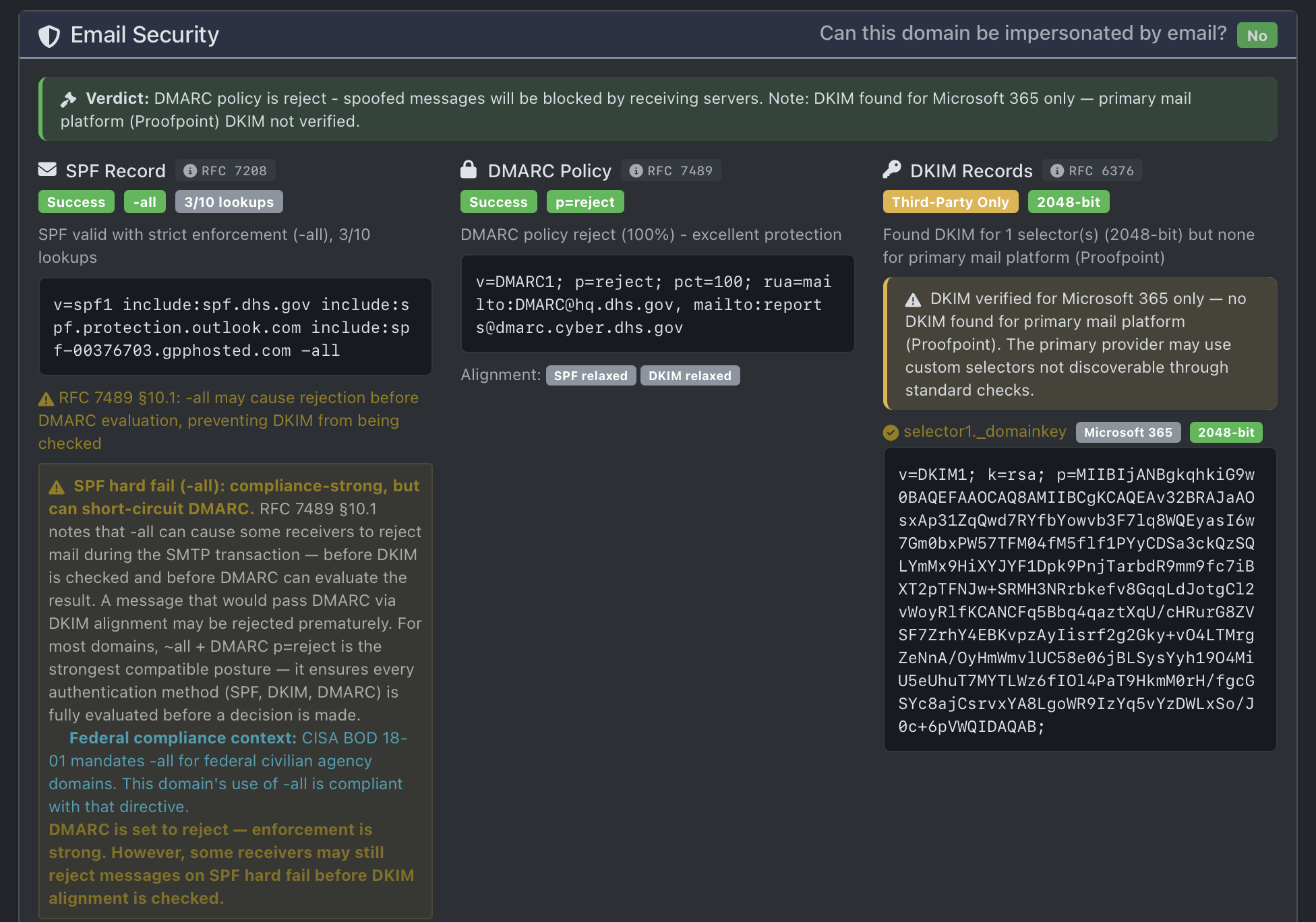
Notice that their policy is set to reject unauthorized messages.
We participate as a stakeholder in CISA's Cyber Hygiene program and continue to apply those operational lessons to real-world DNS and email security work.
Common SPF Misconceptions
Contrary to some misunderstandings, the -all tag in an SPF record does not prevent internal users from sending or receiving email. Instead, it mandates that only explicitly authorized sources are allowed to send email on behalf of the domain. If a service is not listed in the SPF record, mail it sends claiming to be from your domain will fail SPF.
This is why third‑party services such as Mailchimp, Zendesk, CRMs, ticketing systems, and invoicing platforms must be explicitly allowed using include: mechanisms. Without those entries, their messages will fail SPF regardless of whether the mail itself is legitimate.
Where confusion arises is enforcement. SPF -all (hard fail) is often assumed to be "more secure," but RFC 7489 §10.1 explicitly warns that hard fail can cause receiving servers to reject messages before DKIM is evaluated and before DMARC can make a policy decision 1.
This creates a failure mode where a message that fails SPF but would otherwise pass DMARC via DKIM alignment is rejected prematurely. In effect, SPF -all can short‑circuit DMARC, undermining the protocol designed to make final disposition decisions.
SPF was designed as an authorization signal, not a standalone enforcement mechanism. DMARC is the layer that evaluates SPF and DKIM together and applies policy (p=none, quarantine, or reject). Any configuration that prevents DMARC evaluation reduces overall security and breaks standards‑compliant mail flow.
Modern Best Practice vs Legacy Guidance
For active sending domains, the strongest standards-compliant configuration is:
This combination ensures that all authentication mechanisms are fully evaluated before a final decision is made. DMARC alignment, not raw SPF or DKIM pass/fail alone, is what ultimately determines message acceptance. SPF ~all allows DKIM to run, and DMARC acts as the sole enforcement layer, as intended by the protocol design.
Some guidance, including older federal and enterprise deployments, historically favored SPF -all as a defense-in-depth measure. This was largely pragmatic: in 2017, when CISA Binding Operational Directive 18-01 was issued 11, most domains had not yet deployed DMARC, and SPF hard fail acted as a coarse enforcement mechanism.
Today, DMARC p=reject is widely deployed across federal and commercial domains, and DKIM is widely relied upon for message authentication. As of February 2024, Google's email sender guidelines require SPF, DKIM, and an enforced DMARC policy for any sender delivering more than approximately 5,000 messages per day to personal Gmail accounts; Yahoo announced parallel sender requirements that made the same trio effectively mandatory for high-volume mail to Yahoo Mail users, with somewhat different operational framing 12. In this modern context, SPF -all becomes redundant and introduces the RFC 7489 §10.1 risk of premature rejection. Federal infrastructure often tolerates this due to tightly controlled sending paths, but that model does not generalize to commercial, multi-vendor, or cloud-based email environments.
Major mailbox providers now treat DMARC as the authoritative enforcement signal. The combination of SPF ~all with DMARC p=reject provides stronger, more reliable protection than SPF hard fail alone, while remaining fully compatible with modern email authentication flows.
This guidance applies to active sending domains; parked or non-sending domains may safely use SPF -all. For non-sending domains, NIST SP 800-177 Rev. 1 and the IETF have long recommended a null SPF (v=spf1 -all) and DMARC p=reject to make the domain unforgeable for mail purposes 41.
The IETF DMARC working group has been finalizing a revision of RFC 7489, commonly referred to as DMARCbis, which modernizes the protocol — including a more explicit treatment of policy discovery via an organizational-domain boundary independent of the Public Suffix List. Whether the revision has been published as a successor RFC at the time you are reading this or remains in late-stage draft, the working group page is the canonical place to check current status, and operators planning new deployments should design for forward compatibility 13.
Practical Tools for DNS Security
This workflow is tool-agnostic. Use any standards-aware DNS/email auditor, then validate with live delivery testing.
- For a fast baseline and re-check after each change, DNS Tool is one practical option. Its current web build includes SMTP transport verification, DMARCbis readiness checks, MPIC-aware CAA context, and CT subdomain discovery.
- For delivery-path testing with real sent messages and header review, Red Sift Investigate is useful.
- For DNS history and ownership context, SecurityTrails can help.
The goal is evidence, not a specific vendor: baseline, implement, validate, monitor.
Step-by-Step Guide to DMARC Protection (SPF + DKIM + DMARC)
If you're new to DNS security, here's a simple checklist to help you set up DMARC, SPF, and DKIM:
Note: This guide is for custom domain owners (e.g.
you@yourbusiness.com). If you use a free address like@gmail.comor@yahoo.com, you cannot edit these records—this guide is not for you.
Before making changes, run a baseline scan and save the results so you can compare before/after behavior.
If you want to test how your emails are currently landing (e.g. Inbox vs Spam), visit Red Sift's Investigate, copy their test email address, and send an email to it from your CRM, newsletter platform, or invoicing system. Testing from your actual business tools is critical to spotting third-party delivery issues.
In brief: SPF specifies which servers can send on your behalf (like a return-address check) 2, DKIM attaches a digital signature to emails (proving the email hasn't been tampered with) 3, and DMARC ties everything together with a policy and reporting 1.
SPF
- Verify domain ownership. a. The Registrar is where the yearly bill is paid (and could also be the place to edit DNS records – the DNS Host). b. The NS server records tell you where to edit the DNS records; they are the DNS hosts. (This could be GoDaddy, Wix, or another; the two NS servers will give you a hint if you Google them.) c. Choose a DNS host with MFA, change history, and reliable rollback controls.
- Create an SPF record listing authorized email servers: a. The two most typical are: *
v=spf1 include:_spf.google.com ~all(for Google guidance) *v=spf1 include:spf.protection.outlook.com -all(Microsoft's historical default; in modern DMARC-enforced domains,~allis often safer) b. After you construct your policy, copy it into your DNS. c. Note that the two above records do not have entries for other things that may need to send email as your domain (Email Marketing, receipts, and invoices). d. RFC 7208 §4.6.4 caps SPF DNS lookups at 10 — exceeding this causes apermerrorand can fail SPF validation entirely 2.
DMARC
- Set up a DMARC policy. a. Start with a monitoring policy (e.g.,
p=none). b. After you construct your policy, copy it into your DNS. Be sure to specify an email address in theruatag in the DMARC record to receive reports, and monitor them for insights. c. If your DMARC policy remainsp=none, your domain is still in observation mode. Progress top=quarantine, thenp=rejectafter legitimate senders are aligned.
DKIM
- Log in to Microsoft Exchange or Google Workspace (your email service provider) to get your DKIM keys, which you'll also publish in your DNS records. a. DKIM selectors are part of the DKIM record that helps differentiate between multiple keys published under the same domain. This is useful for organizations that send emails through various systems or services (Email Marketing). b. After you find your DKIM keys, copy them into your DNS. RFC 8301 normatively deprecated SHA-1 with RSA for DKIM signing; for key length, the same RFC says signers SHOULD use RSA keys of at least 2048 bits where supported, which has become the operational baseline because 1024-bit keys provide a much smaller margin against modern factoring resources 14. c. Make sure you hit Activate or Start Authentication in Google or Publish in Exchange.
After SPF, DKIM, and DMARC are stable, add transport-layer controls where possible: MTA-STS (RFC 8461) 5, TLS-RPT (RFC 8460) 6, and DANE/TLSA for SMTP (RFC 7672) 7. MTA-STS lets you advertise a policy that receiving mail servers must use TLS with a valid certificate; TLS-RPT requests aggregated reports of TLS negotiation failures so you can detect downgrade attempts; DANE binds your TLS certificate to your DNS records via DNSSEC, making certificate-substitution attacks visible.
Test the setup using your preferred auditor (for example DNS Tool). Validate SPF, DKIM, DMARC, and transport findings together so you confirm policy and real behavior, not just record presence.
To do a final delivery test, go back to Red Sift Investigate and send another email to confirm your updated authentication is passing in real mail flow.
Monitor and adjust as needed.
As your program matures, include DMARCbis readiness checks, CAA review, and CT log monitoring so you catch policy drift and new exposure early.
DNSSEC for Extra Security — and What It Doesn't Do
DNSSEC (DNS Security Extensions, RFCs 4033/4034/4035) protects against DNS spoofing by cryptographically signing DNS responses, giving validating resolvers origin authentication of DNS data, authenticated denial of existence, and data integrity 8. It is a meaningful defense against on-path forgery of DNS responses — the class of attack made famous by Dan Kaminsky's 2008 cache-poisoning vulnerability — and it is the foundation that DANE/TLSA depends on 7.
Two honest scoping notes are worth making explicit. First, DNSSEC authenticates the DNS response (that the IP address or DKIM key you got from DNS is genuinely the one the zone owner published). It does not authenticate the email content — that is what DKIM does — and it does not encrypt mail in transit. Second, global DNSSEC adoption remains uneven: a substantial fraction of authoritative zones publish signed records, but a much smaller fraction of recursive resolvers actually validate. Deploying DNSSEC on your own zone is high-value when paired with DANE; treating it as a substitute for DMARC or transport TLS is a category error.
Common Pitfalls to Avoid
When setting up DMARC and SPF, watch out for these common mistakes:
- Incorrectly formatted DNS records, spaces left before or after, or incorrect format.
- Not updating DNS records after changing email providers.
- Setting overly strict policies initially.
- Be cautious with automated "DNS auto-fix" platforms that request full zone access. Some tools modify records beyond the intended scope. Review diffs before publishing and keep a rollback snapshot of your zone file.
FAQs: Your DNS Security Questions Answered
- Can I set up DMARC and SPF myself? Yes, but it's advisable to consult a DNS security expert if you are unsure.
- What happens if I don't set up DMARC or SPF? Your domain remains easier to impersonate in phishing and BEC campaigns, which can damage trust, disrupt operations, and create direct financial risk.
BIMI
Beyond email authentication, Brand Indicators for Message Identification (BIMI) can improve logo trust signals in supporting inboxes. BIMI requires an enforced DMARC policy (p=quarantine or p=reject) as a precondition, and the BIMI specification — published by the AuthIndicators Working Group — defines the SVG and Verified Mark Certificate requirements 15. Example: Apple's BIMI record points to https://www.apple.com/bimi/v2/apple.svg.
Conclusion
DNS security failures are rarely caused by missing records; they are caused by misinterpreting what those records actually enforce.
Securing your domain and email system is both a technical and business requirement. Implementing DMARC, SPF, and DKIM, then validating transport and issuance controls, materially reduces spoofing and BEC risk.
If you want a second set of eyes, we offer practical DNS/email security reviews and implementation support. The focus is straightforward: clear findings, clean changes, and verifiable outcomes. Call 619-853-5008.
References
Kucherawy, M., & Zwicky, E. (Eds.) (2015). Domain-based Message Authentication, Reporting, and Conformance (DMARC). RFC 7489. Internet Engineering Task Force. https://datatracker.ietf.org/doc/html/rfc7489 (See §10.1 on the SPF -all short-circuit risk: https://datatracker.ietf.org/doc/html/rfc7489#section-10.1.)
Kitterman, S. (2014). Sender Policy Framework (SPF) for Authorizing Use of Domains in Email, Version 1. RFC 7208. Internet Engineering Task Force. https://datatracker.ietf.org/doc/html/rfc7208 (See §4.6.4 on the 10-DNS-lookup processing limit.)
Crocker, D., Hansen, T., & Kucherawy, M. (Eds.) (2011). DomainKeys Identified Mail (DKIM) Signatures. RFC 6376. Internet Engineering Task Force. https://datatracker.ietf.org/doc/html/rfc6376
Chandramouli, R., Garfinkel, S., Nightingale, S., & Rose, S. (2019). Trustworthy Email (NIST Special Publication 800-177 Rev. 1). National Institute of Standards and Technology. https://doi.org/10.6028/NIST.SP.800-177r1
Margolis, D., Risher, M., Ramakrishnan, B., Brotman, A., & Jones, J. (2018). SMTP MTA Strict Transport Security (MTA-STS). RFC 8461. Internet Engineering Task Force. https://datatracker.ietf.org/doc/html/rfc8461
Margolis, D., Brotman, A., Ramakrishnan, B., Jones, J., & Risher, M. (2018). SMTP TLS Reporting. RFC 8460. Internet Engineering Task Force. https://datatracker.ietf.org/doc/html/rfc8460
Dukhovni, V., & Hardaker, W. (2015). SMTP Security via Opportunistic DNS-Based Authentication of Named Entities (DANE) Transport Layer Security (TLS). RFC 7672. Internet Engineering Task Force. https://datatracker.ietf.org/doc/html/rfc7672
Arends, R., Austein, R., Larson, M., Massey, D., & Rose, S. (2005). DNS Security Introduction and Requirements. RFC 4033. Internet Engineering Task Force. https://datatracker.ietf.org/doc/html/rfc4033 (Companion specifications: RFC 4034 on Resource Records, RFC 4035 on Protocol Modifications.)
Federal Bureau of Investigation, Internet Crime Complaint Center. (2024). 2023 Internet Crime Report. https://www.ic3.gov/Media/PDF/AnnualReport/2023_IC3Report.pdf
Verizon. (2024). 2024 Data Breach Investigations Report. https://www.verizon.com/business/resources/reports/dbir/
Cybersecurity and Infrastructure Security Agency. (2017). Binding Operational Directive 18-01: Enhance Email and Web Security. U.S. Department of Homeland Security. https://www.cisa.gov/news-events/directives/bod-18-01-enhance-email-and-web-security
Google. (2024). Email sender guidelines (effective February 2024). https://support.google.com/mail/answer/81126. See also Yahoo Postmaster's parallel guidance: https://senders.yahooinc.com/best-practices/.
Internet Engineering Task Force, DMARC Working Group. DMARC working group (charter and active drafts, including the DMARCbis revision of RFC 7489). https://datatracker.ietf.org/wg/dmarc/about/
Kitterman, S. (2018). Cryptographic Algorithm and Key Usage Update to DKIM. RFC 8301. Internet Engineering Task Force. https://datatracker.ietf.org/doc/html/rfc8301
AuthIndicators Working Group. BIMI: Brand Indicators for Message Identification (specifications, FAQ, and implementation guidance). https://bimigroup.org/
A BibTeX file for these references is available at /field-notes/dns-security-best-practices.bib for one-click import into Zotero or any reference manager.
Last updated April 19, 2026 — verified against RFC 7489, RFC 7208, RFC 6376, NIST SP 800-177 Rev. 1, and current operational email-authentication best practices.